Archives for Windows

Network Win 7 With XP
Welcome to DIY Tech Tips & Guides how to network Win 7 with XP. Since the Windows 7 came up with a new concept in networking called the homegroup, it…
Windows 7 RC upgrade
Upgrade Windows 7 RC to full version Is it possible to upgrade to the real version if you are currently running windows 7 RC? Or any other trial version. Do…

Customize Windows 7
Customize your Windows 7 Desktop Windows 7 is already being used by a lot of people out there. So if I asked you, what do you know that is different…
Mute keyboard shortcut keys
Create your own mute shortcut key A phone call comes in all of a sudden and you need to lower the volume quickly, the best way is to mute the…

Windows 7- Get The Best Out Of Windows 7
Windows 7 Tips and Tricks Windows 7 operating system, is the latest Windows offering from Microsoft and Diy-computer-repairs will show you the 12 coolest things you can do with this…
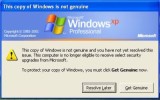
Windows WGA Remover Genuine Advantage Notifications
Get Past The Windows Genuine Advantage Nag Removing WGA notifications is not a difficult task. In this guide you can remove that pesky Windows Genuine Advantage Nag Screen…
Disable Automatic Restarts
Disable Windows Auto Restart After Updates Here’s a way to disable that auto-reboot procedure after a patch has been applied or installed automatically by Windows. We all know that it…

File Sharing Windows With Samba Ubuntu 10.04
Hello and welcome to another awesome guide by DIY Tech Tips & Guides on how to Network Windows and Ubuntu While setting a shared folder in Ubuntu may sound intimidating…
Windows 7 – Choosing Which Version
Windows 7 - The Features of Each Version So many versions of Windows 7, which one to get? Which version would be worth your buck. 32 bit or 64bit. why can't Microsoft just come…